
Gameplay demo
Autonomous AI QA for game studios
More QA coverage.Less budget pressure.
Add an AI QA worker to your production workflow. BugHunter's reasoning agents play real builds, find gameplay issues and retest fixes, bringing video evidence and actionable findings back to your team, coding agents and issue tracker.
Send a game link and one flow you want checked.
Start on the build. No SDK integration required for screen-based testing.
We help you get started. Your team runs it, with support when you need it.
NodeMori overview
AI agents build the game. BugHunter checks how it plays.
AI speeds up game production. QA needs to keep up. Make repeatable checks part of the build cycle, so your team can spend more time on new features, tricky edge cases and the player experience. Start where the pressure is highest: live-ops updates and daily builds.
Watch BugHunter in real games.
Explore recorded gameplay demos. Then see BugHunter on your game.
Independent demos on public game builds. No studio affiliation or endorsement.
- Gameplay demo
Harry Potter: Puzzles & Spells
- Gameplay demo
FarmVille 3
Your game next.
Send a game link and the flow you want checked. We'll prepare a demo around it.
The production loop
Keep QA in the loop, build after build.
Run a check, review the finding, fix the issue and retest the next build. BugHunter keeps the task, gameplay evidence and build history connected, so the next run picks up where the last one left off.
- 01
Define
Choose the build, starting state, checks and expected behavior.
Owner: Studio QA / production
- 02
Build
Create or update the playable build.
Owner: Developers and coding agents
- 03
Play and check
Execute the selected gameplay checks and capture evidence.
Owner: BugHunter
- 04
Review and route
Accept, reject or merge findings; send accepted work to the issue tracker.
Owner: Studio QA, with configured handoff
- 05
Fix
Make the code or content change.
Owner: Developers and coding agents
- 06
Retest
Run the approved check on the new build and compare the result.
Owner: BugHunter, requested by the team or configured workflow
Release approval stays with your studio. BugHunter plays and checks; your team and coding agents own the code, the fixes and the release.
Your coding agent can ask. BugHunter can play.
Use MCP from day one to request checks and retrieve results from Claude Code or another MCP client. Bring a build from Unity or your existing pipeline, let BugHunter run the selected checks, and return the findings to the workflow your team already uses.
Prefer the product? Run everything from BugHunter directly. Claude Code is optional.
Claude Code / MCP
Request checks and retrieve run status and results from Claude Code or another MCP client.
Unity / other engines
Sources of playable builds. Screen-based testing needs no Unity SDK plugin; we qualify the build and target environment first.
Jira / Linear / Slack
Issue and team handoffs configured for your studio. Connectors are set up per project, not enabled by default.
Build upload / CI hooks
Upload a build or point BugHunter at your pipeline. Automatic triggers run only where they are configured.
Plays the build. Prepares the report. Retests the fix.
More time in the game. Less time writing up bugs.
Real findingMystic Duel · public store build 1.5.5· Free-play run 9261, step 8
Grammar errors in a tutorial line
Task: free-play session through the tutorial and early progression.
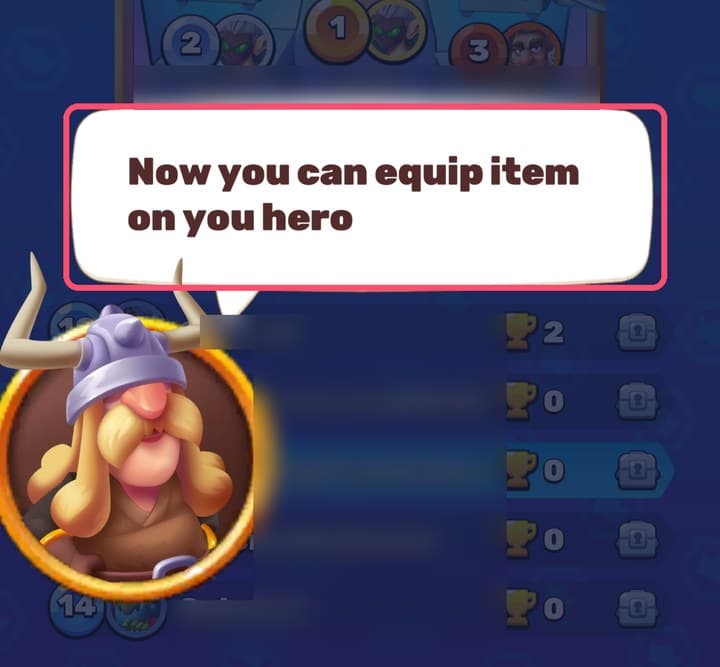
Expected: The line reads “Now you can equip an item on your hero.”
Observed: “Now you can equip item on you hero”: the article is missing and “your” is written as “you”.
Recorded action path
- On the main screen, claim the Stone League reward.
- Open the chest with Open All.
- Claim the new hero, Kieran the Assassin.
- Close the Get More Gems offer.
- Read the tutorial line that appears as the tutorial points to Heroes.
- Check outcome
- Issue flagged, kept by the automatic re-check. Rated not critical by the agent.
- Gameplay evidence
- Screenshot and video clip captured for the step.
- Logs and state
- Session console logs available. No internal game state: screen-based run, no integration.
- QA review
- No human verdict recorded yet.
- Linked issue
- None recorded. Studio triage not recorded.
- Retest
- No retest recorded for this finding.
Watch a run end to end: BugHunter plays the build, captures the gameplay and packages what it found for your team to review.
NodeMori at GDC 2026Tested across real game builds and refined with direct studio feedback.
Seen at GDC 2025 and GDC 2026
Refined with direct feedback from studios and game industry teams.
Your QA worker. Your workflow.
Start with onboarding for your game, then choose how much support you need.
Run it with your team
Select builds and checks, start runs, review findings, and request retests.
Add hands-on support
Get help preparing checks, maintaining the workflow, or running an agreed batch when your team needs extra support.
Add support for a busy release or make it part of your ongoing workflow.
Every run adds experience. Every build starts smarter.
BugHunter builds on the paths it has explored, the checks it has run and the feedback your QA team provides. Every run adds experience; QA-approved findings and expectations become reusable game knowledge for the next build.
Add testing capacity without briefing every run from scratch.
Game Knowledge from QA Findings
Keep approved checks, useful gameplay paths and known issues ready for the next run. Your team's knowledge carries forward as the game changes.
Build History & Traceability
Follow a finding from the build where it appeared to the gameplay evidence, the linked issue and the retest after a fix.
Game knowledge is stored context for your game, not a shared model trained on it. Only QA-approved results become accepted knowledge, and a failed run never counts as a passed check. The first game setup still includes onboarding; reuse cuts the repeated briefing after that.
See what builds game knowledgeFind where a new player gets lost.
Ask BugHunter for a simulated player review of a tutorial, progression path or live event. See where instructions are unclear, rewards are confusing or progress gets blocked, with gameplay evidence your team can inspect.
Go beyond “did it pass?” Understand what made the flow hard to play.
Default perspective
First-time player
Review a flow
- Tutorial
- Progression path
- Live event
See where it gets hard to play
- Instructions are unclear
- Rewards are confusing
- Progress gets blocked
A simulated review based on gameplay, not real-player sentiment or audience research. Your team inspects the evidence and decides what to change.
For publishers
A clearer view of each submitted build.
Run agreed checks on a studio's build and bring the results into your milestone review. See what was tested, what needs attention, and which fixes were verified. Start with one title, then extend the workflow to the next.
A partner submits a new milestone build
A clear view of what was tested, what needs attention, and what remains unchecked.
The developer reports a fix
Evidence that connects the issue to the observed retest result.
Release calendars collide
Per-title results and outstanding work for the next production review.
A publisher receives an authorized summary for the agreed title and build. Reviewing a build does not grant access to a studio's private gameplay or training data for other titles.
Four QA tasks. One worker.
BugHunter takes on different QA jobs depending on what you need checked. Each task has a clear input and a clear output your team can review.
Task availability depends on the game and build. Your team sets the checks and accepts the results.

Freeplay
Explore a goal
Follow an open-ended objective within a run limit and capture observations, blockers, and the path taken.
Learn more
Testcase
Check expected behavior
Execute approved steps and compare the observed result with the expected behavior on the current build.
Runs on the deterministic test-case capability shown in the product.
Learn moreRegression
Retest across builds
Repeat approved checks and accepted issue paths on a later build, using the relevant baseline.
Reuses the deterministic test-case execution on a later build.
Learn more
Scout
Understand the build
Explore a selected area and draft the mechanics, flows, and candidate checks for your team to review.
Learn moreWhere BugHunter plays today
- Android
- iOS
- Windows
- macOS
- Web
- Consoles*
Mobile-first. PC and web setups confirmed for your game.
*Consoles: contact us about your target platform.
GameplayPublic status
- Turn-based gameplay, UI flows and repeatable checksAvailable today
- Dynamic gameplay using configured agent skillsGame-specific setup
- Fast-paced real-time 3D and AAA shootersIn testing · Discuss a partner pilot
Fast gameplay. AI-powered analysis.
In testing / Partner pilotFor sessions that need human reflexes, keep the tester in control and let AI help with the analysis. Our partner-pilot workflow analyzes recorded gameplay, flags potential issues and drafts reports for review, starting with video and no SDK integration.
We are also developing SDK-assisted automation for deeper game access with partners.
One clear plan. A measurable pilot.
About $5 per agent-hour at full plan usage. $990/month includes 200 active agent-hours.
Studio
$990/month
Monthly subscription. No annual commitment.
200 active agent-hours included
$4.95 per agent-hour at full plan usage.
- Continuous testing across builds
- AI QA agent (dedicated capacity)
- Run history and reports
- Priority queue
- 7-day setup period with our team
We confirm what your setup includes for model usage, devices, onboarding and review support before you subscribe.
Partner / On-prem
Power your QA services with BugHunter.
Add AI execution to your client delivery, with on-premise options, compatible local models or your own model-provider account.
Custom deployment, capacity and support.
- On-premise deployment options
- Compatible local models or your own model-provider account
- Multiple AI agents for client delivery
- Managed onboarding and workflow setup
See Security & Deployment for how model connections and data flows are defined.
Put one release-critical flow to the test.
Pick a tutorial, progression path, purchase flow or recurring regression check. Compare BugHunter with your current process and see what your team can cover with less manual work.
Pilot targets to validate on your workflow
Manual QA cost
60% lowermanual QA cost on selected repeatable checks
Report preparation
80% lessreport preparation time
Check throughput
Up to 3×as many completed checks in the same time window
Pilot goals, not measured results or guarantees. Targets are evaluated against your current workflow at comparable scope and review quality.
Frequently asked questions
See it on your game. Then make it part of your team.
Send a game link and see BugHunter in action. We help you set up the product and get your team running. Add ongoing support whenever you need it.